Over the previous posts in this series we took the C64 apart piece by piece. Registers, memory, instructions, flow control, and the hardware chips. Now we put it all back together into something that works.
The project is a five-note mini piano. The keys Z X C V B play C D E F G. Each note changes the screen border color, plays a sound through the SID, and displays the note letter in the center of the screen. Simple enough to fit in one post, complex enough to use all three chips together.
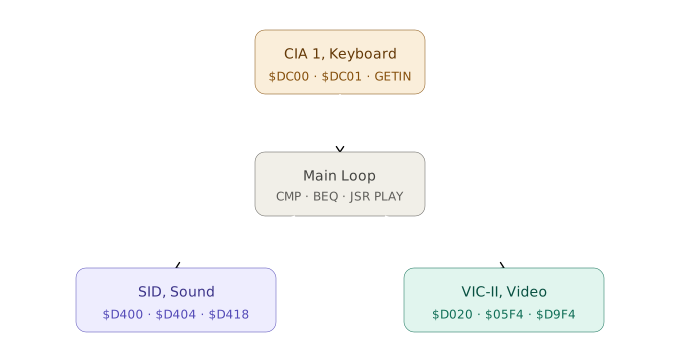
The role of each chip is straightforward. The CIA 1 reads the keyboard, the SID generates the sound, and the VIC-II handles the visuals. The main loop is the conductor coordinating all three.
The BASIC stub and the entry point
Assembly programs on the C64 need a small BASIC stub at the start so that RUN works. It lives at $0801, the address where the BASIC interpreter looks for the first program line, and contains a single line that tells the processor to jump to the assembly code right after it.
Before reading this code, there is one thing to notice. Not everything in an assembly source file is a processor instruction. Some lines are assembler directives, commands for the assembler itself rather than for the processor. *=$0801 tells the assembler to place the following bytes starting at address $0801. .WORD $080B tells it to store the value $080B as two bytes in little-endian. .BYTE $9E stores a single byte. The processor never reads these directives. By the time it runs the program, the assembler has already done its job and all that remains in memory are the raw bytes.
*=$0801
        .WORD $080B         ; pointer to the next BASIC line
        .WORD $000A         ; line number: 10
        .BYTE $9E           ; SYS token
        .BYTE "2064"        ; 2064 = $0810 in decimal
        .BYTE $00           ; end of line
        .WORD $0000         ; end of BASIC program

*=$0810                     ; code starts here
Modern assemblers like KickAssembler and ACME handle this automatically, but it is worth knowing what is happening. $9E is the BASIC token for SYS, and the following bytes are the number 2064 as text, the address where the assembly begins. When you type RUN, BASIC executes SYS 2064 and control passes to our code.
Initialization
Before entering the loop, we configure the SID and VIC-II to a known state. The SID in particular needs attention. At power-on, its registers may hold random values and generate noise.
INIT:
        ; Silence the SID and configure voice 1
        LDA #$00
        STA $D418           ; master volume = 0 (total silence)
        STA $D404           ; turn off gate and waveform for voice 1

        LDA #$08            ; attack=0 (instant), decay=8 (medium)
        STA $D405
        LDA #$F4            ; sustain=F (maximum), release=4 (medium)
        STA $D406

        LDA #$0F
        STA $D418           ; master volume = 15 (maximum)

        ; Initial colors: black screen
        LDA #$00
        STA $D020           ; border: black
        STA $D021           ; background: black

        ; Clear screen via KERNAL
        LDA #$93            ; PETSCII: CLR (clear screen and home cursor)
        JSR $FFD2           ; CHROUT -- prints the control character
        RTS
The value $93 is not a visible character. It is a PETSCII control code that the video chip interprets as “clear the screen”. Sending it to the KERNAL’s CHROUT is the simplest way to start with a clean screen without writing directly to all 1,000 bytes of screen RAM.
The SID envelope is worth a note. $D405 and $D406 store the four ADSR parameters as 4-bit nibbles. Attack=0 means the note reaches maximum volume instantly, right for a piano. Release=4 gives a soft decay when the note ends instead of cutting abruptly.
The main loop and keyboard reading
CIA 1 exposes the keyboard as an 8×8 matrix accessible through registers at $DC00 and $DC01. Iterating through the full matrix manually is tedious, so for this project we use the KERNAL’s GETIN routine ($FFE4), which does that work for us and returns in A the PETSCII code of the last key pressed, or zero if no key was pressed.
MAIN:
        JSR INIT

LOOP:
        JSR $FFE4           ; GETIN: A = key code (0 = none)
        BEQ LOOP            ; A=0, no key -- loop back

        CMP #$5A            ; 'Z' in PETSCII = 90 = $5A
        BEQ PLAY_C
        CMP #$58            ; 'X' = 88 = $58
        BEQ PLAY_D
        CMP #$43            ; 'C' = 67 = $43
        BEQ PLAY_E
        CMP #$56            ; 'V' = 86 = $56
        BEQ PLAY_F
        CMP #$42            ; 'B' = 66 = $42
        BEQ PLAY_G

        JMP LOOP            ; unknown key, ignore
Each CMP compares the value in A with the PETSCII code of the key. When a match is found, BEQ branches to that note’s block. If none of the comparisons match, JMP LOOP discards the key and starts over.
Setting up and playing each note
Each note block does three things. It sets the frequency in the SID, changes the border color in the VIC-II, and writes the note letter to the screen.
SID frequencies are calculated with the formula Fn = Fout × 16,777,216 / Fclk. On the C64 PAL, Fclk is approximately 985,248 Hz. For middle C (261 Hz), the result is 4457 = $1169. Each note occupies two bytes in little-endian, low byte first, high byte second.
PLAY_C:
        LDA #$69
        STA $D400           ; freq low  -- $1169 ≈ C4 (261 Hz)
        LDA #$11
        STA $D401           ; freq high
        LDA #$02
        STA $D020           ; border: red (color 2)
        LDA #$03
        STA $05F4           ; 'C' on screen -- screen code 3, row 12 col 20
        LDA #$01
        STA $D9F4           ; char color: white (color RAM = screen RAM + $D400)
        JSR PLAY
        JMP LOOP

PLAY_D:
        LDA #$89
        STA $D400           ; $1389 ≈ D4 (293 Hz)
        LDA #$13
        STA $D401
        LDA #$05
        STA $D020           ; border: green
        LDA #$04
        STA $05F4           ; 'D' -- screen code 4
        LDA #$01
        STA $D9F4           ; char color: white (color RAM = screen RAM + $D400)
        JSR PLAY
        JMP LOOP

PLAY_E:
        LDA #$F0
        STA $D400           ; $15F0 ≈ E4 (329 Hz)
        LDA #$15
        STA $D401
        LDA #$06
        STA $D020           ; border: blue
        LDA #$05
        STA $05F4           ; 'E' -- screen code 5
        LDA #$01
        STA $D9F4           ; char color: white (color RAM = screen RAM + $D400)
        JSR PLAY
        JMP LOOP

PLAY_F:
        LDA #$3E
        STA $D400           ; $173E ≈ F4 (349 Hz)
        LDA #$17
        STA $D401
        LDA #$07
        STA $D020           ; border: yellow
        LDA #$06
        STA $05F4           ; 'F' -- screen code 6
        LDA #$01
        STA $D9F4           ; char color: white (color RAM = screen RAM + $D400)
        JSR PLAY
        JMP LOOP

PLAY_G:
        LDA #$18
        STA $D400           ; $1A18 ≈ G4 (392 Hz)
        LDA #$1A
        STA $D401
        LDA #$04
        STA $D020           ; border: purple
        LDA #$07
        STA $05F4           ; 'G' -- screen code 7
        LDA #$01
        STA $D9F4           ; char color: white (color RAM = screen RAM + $D400)
        JSR PLAY
        JMP LOOP
The address $05F4 is the center position of the screen ($0400 + 12 × 40 + 20). The C64 screen RAM uses screen codes, not PETSCII. A is 1, B is 2, C is 3, and so on. The corresponding address in color RAM is $D9F4 ($D800 + $01F4), where we write the character color.
The PLAY subroutine
PLAY is called by every note block. It activates voice 1 with a triangle waveform, waits a fixed amount of time, then turns off the gate, beginning the release phase of the envelope.
PLAY:
        LDA #$11            ; triangle waveform ($10) + gate ON ($01)
        STA $D404           ; note starts here

        ; Delay of ~0.33 seconds
        ; Calculation: 255 outer × 255 inner × ~5 cycles = ~326,000 cycles
        ; At 985,248 Hz (PAL): ~0.33 seconds
        LDX #$FF
WAIT1:  LDY #$FF
WAIT2:  DEY
        BNE WAIT2           ; inner loop: 255 × 5 cycles ≈ 1,275 cycles
        DEX
        BNE WAIT1           ; outer loop: repeats 255 times

        LDA #$10            ; keep triangle waveform, gate OFF
        STA $D404           ; start release -- note fades smoothly

        LDA #$00
        STA $D020           ; restore border to black
        RTS
The delay uses two nested loops counting clock cycles, the standard way to create precise pauses in 6510 assembly. For longer notes, increase the initial value of LDX. For shorter ones, decrease it. Each unit of LDX is roughly 1.3 milliseconds.
How to run it
Save the code in a .asm file, assemble it with KickAssembler or ACME, and open the generated .prg in the VICE emulator. Inside the emulator, LOAD "PIANO",8,1 followed by RUN will start the program. Press Z, X, C, V, or B.
If you want to experiment directly without assembling, VICE has a machine language monitor accessible from the Debug menu. You can type the bytes directly into memory starting at $0810 and then G $0810 to execute, exactly the way it was done in the 1980s.
What you can try now
The structure is in place. Some natural extensions:
More notes. A full octave has 12 notes. Calculate the frequencies with the formula Fn = Fout × 16,777,216 / 985,248, convert to hexadecimal, and add more blocks following the same pattern.
Different waveforms. The value $11 in $D404 selects triangle wave. Switch to $21 (sawtooth), $41 (square), or $81 (noise). Each has a completely different timbre. Noise, for example, becomes percussion.
Sustain while the key is held. GETIN only detects the moment a key enters the buffer. For real sustain, read the CIA 1 matrix directly at $DC01 inside a loop that checks whether the key is still pressed before turning off the gate.
Two voices at once. The SID has three independent voices, each with its own frequency, waveform, and envelope registers. Setting voice 1 and voice 2 to different frequencies gives you two simultaneous notes.
That closes the series. We started at Part I without knowing what a register was and we end here. Three chips coordinated by a loop of a few dozen instructions, doing something you can hear and see. There is no magic in the path between the two. Just bytes, addresses, and the processor doing what it was designed to do.