In the four previous posts we built the complete model. Registers, memory, instructions, decisions, and loops. You already know how a program moves through memory and how the processor executes every byte it encounters. What is missing is the most surprising part of the C64 story, and probably the most elegant idea in the entire series.
Writing to memory was triggering hardware
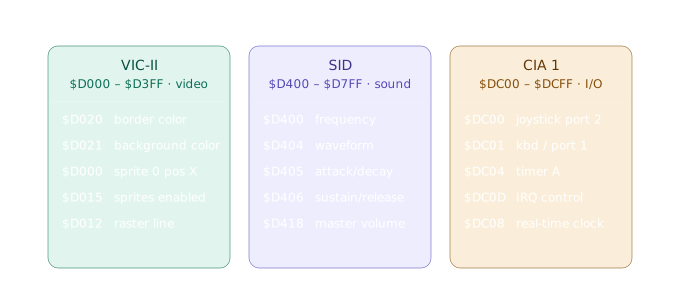
In the post about the memory map we saw that certain regions were not regular RAM. The range from $D000 to $DFFF belonged to the hardware chips. The VIC-II, the SID, and the CIA. But what that means in practice only becomes clear when you see the code.
To change the border color on the C64, you wrote:
LDA #$02    ; 2 = red in the C64 palette
STA $D020   ; write to the border color register
Two instructions. No system call. No driver. No API. You wrote a byte to an address and the border turned red immediately, on the next clock cycle. This is memory-mapped I/O: the hardware chips lived in the same address space as RAM, and writing to those addresses did not store data. It commanded the hardware directly.
There was no layer between the code and the effect. None.
VIC-II, video without a graphics card
The VIC-II exposed its 47 registers in the region $D000 to $D02E. Each one controlled an aspect of what appeared on screen. Colors, sprite positions, graphics mode, scrolling, synchronization with the video beam.
The C64 palette was fixed at 16 colors, numbered 0 to 15. Color 0 was black, 1 white, 2 red, and so on. To change the background:
LDA #$06    ; 6 = blue
STA $D021   ; background color register
Sprites followed the same pattern. Each sprite had two registers for position, one for X and one for Y, plus control bits spread across other registers. To enable sprite 0 and position it:
LDA #$01
STA $D015   ; bit 0 = sprite 0 enabled

LDA #$60    ; X position = 96
STA $D000   ; sprite 0 X register

LDA #$80    ; Y position = 128
STA $D001   ; sprite 0 Y register
One detail that shows the level of control available: the VIC-II drew the screen line by line, top to bottom, 50 times per second in PAL standard. Register $D012 reported which line the beam was on at that exact moment. Programs that wanted visual effects synchronized with the raster, like changing colors halfway down the screen, had to wait for the beam to reach the right line before writing to the register. Experienced programmers did this in loops that counted clock cycles, knowing exactly how many instructions fit between one line and the next.
SID, a synthesizer inside a chip
The SID had three independent voices. Each could play a different frequency with its own waveform and amplitude envelope. To play a note, you wrote the frequency to the voice registers, chose a waveform, and activated the gate:
LDA #$0F
STA $D418       ; master volume = 15 (maximum)

LDA #$25        ; frequency low byte (approximate A note)
STA $D400
LDA #$1D        ; frequency high byte
STA $D401

LDA #$A0        ; fast attack, medium decay
STA $D405
LDA #$F0        ; high sustain, long release
STA $D406

LDA #$11        ; triangle waveform + gate ON
STA $D404       ; the note starts playing here
Eight memory writes and you had a triangle oscillator playing a note with a complete envelope. To silence it, turn the gate off. LDA #$10 / STA $D404. To play a different note, just change the frequency registers while the gate is active.
The ADSR envelope, Attack, Decay, Sustain, Release, is a concept from analog synthesis. It defines how the volume of a sound behaves over time. How long it takes to reach maximum volume when a note starts, how it decays after that, what volume it sustains while the note is held, and how long it takes to fade after release. The four parameters were split across the two bytes at $D405 and $D406, four bits each.
CIA, reading the joystick
The CIA handled inputs, and reading the joystick was one of the most common operations in games. Register $DC00 held the state of the two control ports:
LDA $DC00       ; read joystick port
AND #$10        ; isolate the fire button bit
BNE no_fire     ; if bit = 1, button is NOT pressed
; reached here: button is pressed
no_fire:
The counterintuitive detail is the inverted logic. Bit 0 means the button is pressed, bit 1 means released. This is called active-low, common in hardware of that era where the physical pin was pulled low when active. Each joystick direction corresponds to a bit:
Bit 0 → up
Bit 1 → down
Bit 2 → left
Bit 3 → right
Bit 4 → fire button
Checking whether the player was going up and right at the same time was just a matter of checking both bits with logical operations. There was no “input event” abstraction. It was raw hardware reading.
The main game loop
With all of this in place, the structure of a C64 game was straightforward:
game_loop:
        JSR read_joystick
        JSR update_player
        JSR check_collisions
        JSR update_sprites
        JSR wait_raster      ; sync with $D012
        JMP game_loop
The wait_raster subroutine was the heart of synchronization. It sat in a loop reading $D012 until the beam reached a specific line, usually below the visible area of the screen. Only then did the loop advance to the next frame. This ensured that all sprite and color updates happened while the beam was not drawing, avoiding the visual tearing that occurs when you update a sprite mid-scan.
This pattern of manually synchronizing with the video hardware is the direct ancestor of the VSync you know from modern game engines. The difference is that on the C64 you implemented it by hand, knowing exactly what you were doing and why.
At this point you know the three chips and what each address does. The VIC-II changes what appears on screen. The SID generates sound. The CIA reads the outside world. Each one lives in the memory map and responds to writes as if they were commands.
What remains is seeing all three working together in a real program, not in isolated examples but coordinated by a loop that reads a key, plays a note, and changes a color at the same time. That is exactly what we will do in the next post.