In the previous post we saw that the processor has three general-purpose registers and a simple, uninterrupted execution cycle. The problem is that three registers are not enough for any real program. You need somewhere to store data while you are not using it, store the program itself, store variables and intermediate results. That place is RAM.
RAM is one giant array
If you have ever used an array in any language, you already understand RAM. The C64’s memory was exactly that:
RAM = [0] * 65536 # 65,536 slots, each holding 1 byte
Each slot holds one byte, a number from 0 to 255. Nothing more. Text, images, sound, code. Everything becomes bytes. And each slot has an address, a number that identifies where it is, exactly like the index of an array.
To read or write, you told the processor to go to address X and get what was there, or go to address X and put a value there. No layers, no abstractions. Direct.
Why hexadecimal
Addresses in C64 assembly were written in hexadecimal, with a $ prefix, like $0000, $D418, $FFFF. At first glance it seems arbitrary, but there is a very practical reason.
Hexadecimal uses 16 digits instead of the 10 in decimal. 0 through 9, then A, B, C, D, E, F. The consequence is that one byte, any value from 0 to 255, always fits in exactly two hexadecimal digits, from $00 to $FF. Two bytes, like a memory address, always fit in four digits, from $0000 to $FFFF.
In decimal, the same byte would need 1 to 3 digits depending on the value. Aligning, comparing, and reading addresses would be a mess. In hexadecimal, everything has a fixed and predictable size. Once you get used to it, it feels as natural as reading time on a 12-hour clock.
| Decimal | Hexadecimal |
|---|---|
| 0 | $00 |
| 15 | $0F |
| 16 | $10 |
| 255 | $FF |
| 256 | $0100 |
| 65535 | $FFFF |
The memory map
Here is the central difference between programming on the C64 and programming today. Memory was not all the same.
Every address range had a fixed role, and you needed to know by heart what lived where. Some addresses were regular RAM where you stored data and code. Others were direct ports to the hardware chips. Writing to those addresses stored nothing, it triggered the hardware immediately. And others were ROM, code burned into the chip that you could read but not change.
No operating system was there to explain what was what. There was the memory map, and you memorized it.
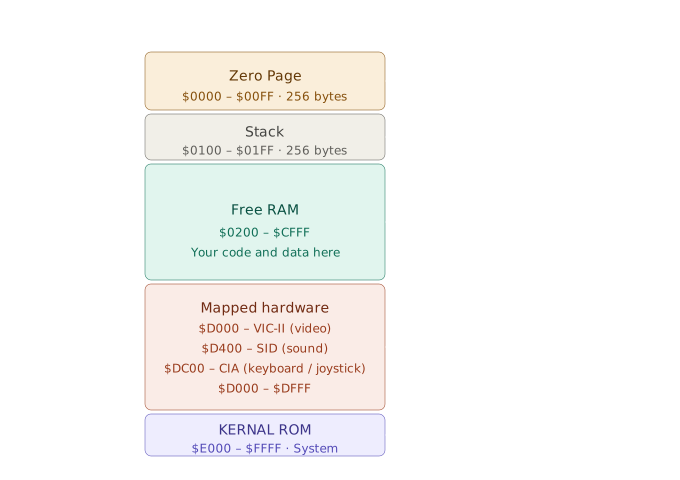
The Zero Page, 256 bytes of gold
The range from $0000 to $00FF had its own name. Zero Page. Just 256 bytes, but worth far more than any other byte in RAM.
The reason was technical. A normal address needs 2 bytes to be represented. For example, $0801 occupies one byte for $08 and another for $01. An address in the Zero Page needs only 1 byte, because the processor already knows the first byte is zero. Fewer bytes in the instruction means a smaller instruction that executes faster.
Instruction accessing normal RAM:
  LDA $0801   →  3 bytes in memory, 4 clock cycles

Instruction accessing Zero Page:
  LDA $42     →  2 bytes in memory, 3 clock cycles
One fewer clock cycle might seem irrelevant. But inside a loop that runs thousands of times per video frame, and the C64 drew the screen 50 times per second, the difference was enormous. Programmers treated every byte of the Zero Page as a scarce resource. Critical variables went there. Loop counters went there. Pointers that would be accessed hundreds of times per second went there.
It was, in essence, a manual cache. You decided what was important enough to deserve an address on the first page.
In the next post we leave the memory map and look at what the processor actually does with all of this. How instructions are represented as bytes, what an opcode is, and the first real assembly commands of the 6510.