In Part I we covered the landscape. The era, the machine, the context. Now it is time to go one level deeper and understand how the processor actually works. Where data lives, how instructions are read, and what happens every fraction of a second while a program runs.
Registers, the processor’s workspace
When you write something like x = 5 + 3 in any modern language, the processor needs to pick up the 5 from somewhere, pick up the 3 from somewhere, add them together, and store the result. That “somewhere” is the registers.
A register is a storage space that lives inside the processor itself. RAM is a massive warehouse sitting on the outside. The processor has to make a trip all the way out there to fetch anything. A register is the processor’s pocket. Tiny, but instant.
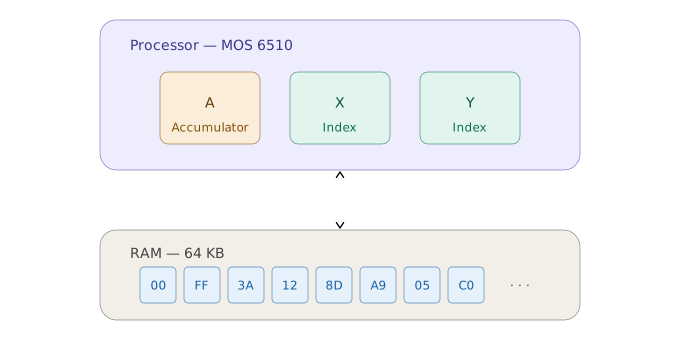
Every arithmetic and logical operation happens inside the registers. RAM is just where you stash things when you are not actively using them.
The MOS 6510 in the Commodore 64 had exactly three general-purpose registers:
A, the Accumulator. The main register. Practically every operation goes through it. Additions, subtractions, logical operations, reading and writing to memory. The name comes from accumulating results. If the 6510 were a kitchen, the A would be the cutting board. Everything passes through it at some point.
X and Y, the Index Registers. They work as counters and position pointers. The name comes from index, as in the index of an array. The i in a Python for loop? That was exactly the role of X or Y in assembly. You used them to traverse lists, navigate memory, count iterations.
Three registers is very few, and that was by design. In 1975, when the 6502 was engineered, each register cost transistors, and transistors cost money and physical space on the chip. The engineering mindset of the era was to do more with less. In practice, this meant the programmer had to plan carefully which register would hold which piece of data, and temporarily push values out to RAM whenever all three were occupied. It was like programming with only three variables available at any given moment.
The execution cycle, how the processor reads a program
Here is something that permanently changes how you see a program. For the processor, there is no distinction between code and data. Everything in memory is bytes. What makes a byte an instruction is simply the fact that the processor is pointing at it at the right moment.
The processor runs an endless and very simple cycle:
1. Read the byte at the address the PC points to
2. Interpret that byte as an instruction
3. Execute the instruction
4. Advance the PC
5. Repeat
The PC here is the Program Counter, a special register that does not store program data but the address of the next instruction to execute. Its only job is to tell the processor where it is on the memory map. It is the execution cursor.
This cycle never stops. As long as the C64 is on, the 6510 is repeating this loop millions of times per second, reading a byte, executing, advancing, reading the next. No scheduler, no operating system managing any of this. Just the processor running on autopilot, without pause.
When a program crashed on the C64, what usually happened is that the PC ended up pointing at an address containing random data, and the processor tried to interpret those bytes as valid instructions. The result was unpredictable. Sometimes the screen froze, sometimes garbage appeared, sometimes the machine rebooted. There was no safety net. None at all.
Special registers
Besides A, X, and Y, the 6510 had three more registers that do not store program data but control how the processor itself operates:
The PC (Program Counter) we already covered. It points to the next instruction.
The SP (Stack Pointer) points to the top of the stack, a special region of memory used to store return addresses when the program calls a subroutine. When you jump into a routine and come back, the SP is what remembers where you were before the call.
The SR (Status Register) is different from all the others. Instead of storing a number, it holds 8 independent bits called flags, each with a specific meaning. One flag lights up when the result of an operation is zero. Another when the result is negative. Another when an addition overflowed the limit of a single byte. These flags are the foundation of every decision a program makes. The if statements, the loops, the comparisons. We will get into this properly in Part IV.
General-purpose registers:   A   X   Y
Control registers:            PC  SP  SR
In the next post we step outside the processor and look at what surrounds it. RAM, how it is organized into addresses, what hexadecimal actually is, and why certain regions of memory were worth their weight in gold.